mysql数据库

登录和退出MySQL服务器

1
2
3
4
#登陆
mysql -uroot -p12345612;
#退出
exit;


增删改查基本语法

1
2
3
4
5
6
7
8
9
10
11
12
13
14
15
16
17
18
19
20
21
22
23
24
25
26
27
28
29
30
31
32
33
34
35
36
37
38
39
40
-- 显示所有数据库
show databases;

-- 创建数据库
CREATE DATABASE test;

-- 切换数据库
use test;

-- 显示数据库中的所有表
show tables;

-- 创建数据表
CREATE TABLE pet (
name VARCHAR(20),
owner VARCHAR(20),
species VARCHAR(20),
sex CHAR(1),
birth DATE,
death DATE
);

-- 查看数据表结构
-- describe pet;
desc pet;

-- 查询表
SELECT * from pet;

-- 插入数据
INSERT INTO pet VALUES ('puffball', 'Diane', 'hamster', 'f', '1990-03-30', NULL);

-- 修改数据
UPDATE pet SET name = 'squirrel' where owner = 'Diane';

-- 删除数据
DELETE FROM pet where name = 'squirrel';

-- 删除表
DROP TABLE myorder;


mysql 建表约束

主键约束:

1
2
3
4
5
6
7
8
9
10
11
12
13
14
15
16
17
18
19
20
21
22
23
24
25
26
27
28
29
30
31
32
33
34
35
36
37
38
39
40
41
42
43
44
45
46
47
48
49
50
51
52
53
54
55
56
57
58
59
60
61
62
63
64
65
66
-- 主键约束
-- 使某个字段不重复且不得为空,确保表内所有数据的唯一性。
CREATE TABLE user (
id INT PRIMARY KEY,
name VARCHAR(20)
);

mysql> desc user;
+-------+-------------+------+-----+---------+-------+
| Field | Type | Null | Key | Default | Extra |
+-------+-------------+------+-----+---------+-------+
| id | int(11) | NO | PRI | NULL | |
| name | varchar(20) | YES | | NULL | |
+-------+-------------+------+-----+---------+-------+

-- 联合主键
-- 联合主键中的每个字段都不能为空,并且*加起来*不能和已设置的联合主键重复即可。
CREATE TABLE user2 (
id INT,
name VARCHAR(20),
password VARCHAR(20),
PRIMARY KEY(id, name)
);

mysql> desc user2;
+----------+-------------+------+-----+---------+-------+
| Field | Type | Null | Key | Default | Extra |
+----------+-------------+------+-----+---------+-------+
| id | int(11) | NO | PRI | NULL | |
| name | varchar(20) | NO | PRI | NULL | |
| password | varchar(20) | YES | | NULL | |
+----------+-------------+------+-----+---------+-------+

-- 自增约束:auto_increment
-- 自增约束的主键由系统自动递增分配。
create table user3(
id int primary key auto_increment,
name varchar(20)
);

mysql> desc user3;
+-------+-------------+------+-----+---------+----------------+
| Field | Type | Null | Key | Default | Extra |
+-------+-------------+------+-----+---------+----------------+
| id | int(11) | NO | PRI | NULL | auto_increment |
| name | varchar(20) | YES | | NULL | |
+-------+-------------+------+-----+---------+----------------+


insert into user3 (name) values ('zhangsan');

mysql> select * from user3;
+----+----------+
| id | name |
+----+----------+
| 1 | zhangsan |
+----+----------+


-- 添加主键约束
-- 如果忘记设置主键,还可以通过SQL语句设置(两种方式):
ALTER TABLE user ADD PRIMARY KEY(id);
ALTER TABLE user MODIFY id INT PRIMARY KEY;

-- 删除主键
ALTER TABLE user drop PRIMARY KEY;

唯一约束:

1
2
3
4
5
6
7
8
9
10
11
12
13
14
15
16
17
18
19
20
21
-- 建表时创建唯一字段
CREATE TABLE user5 (
id INT,
name VARCHAR(20),
UNIQUE(name)
);

#表示(id,name)合在一起不同即可
CREATE TABLE user6 (
id INT,
name VARCHAR(20),
UNIQUE(id,name)
);

-- 添加唯一约束
-- 如果建表时没有设置唯一约束,还可以通过SQL语句设置(两种方式):
ALTER TABLE user ADD UNIQUE(name);
ALTER TABLE user MODIFY name VARCHAR(20) UNIQUE;

-- 删除唯一约束
ALTER TABLE user DROP INDEX name;

非空约束:

1
2
3
4
5
6
7
8
9
10
11
12
13
14
15
16
17
18
-- 建表时添加非空约束
-- 约束某个字段不能为空
CREATE TABLE user7 (
id INT,
name VARCHAR(20) NOT NULL
);

mysql> desc user7;
+-------+-------------+------+-----+---------+-------+
| Field | Type | Null | Key | Default | Extra |
+-------+-------------+------+-----+---------+-------+
| id | int(11) | YES | | NULL | |
| name | varchar(20) | NO | | NULL | |
+-------+-------------+------+-----+---------+-------+


-- 移除非空约束
ALTER TABLE user MODIFY name VARCHAR(20);

默认约束:

1
2
3
4
5
6
7
8
9
10
11
12
13
14
15
16
-- 建表时添加默认约束
-- 约束某个字段的默认值
CREATE TABLE user9 (
id INT,
name VARCHAR(20),
age INT DEFAULT 10
);

mysql> desc user9;
+-------+-------------+------+-----+---------+-------+
| Field | Type | Null | Key | Default | Extra |
+-------+-------------+------+-----+---------+-------+
| id | int(11) | YES | | NULL | |
| name | varchar(20) | YES | | NULL | |
| age | int(11) | YES | | 10 | |
+-------+-------------+------+-----+---------+-------+

外键约束:

1
2
3
4
5
6
7
8
9
10
11
12
13
14
15
16
17
18
19
20
21
22
23
24
25
26
27
28
29
30
31
32
33
34
35
36
37
38
39
-- 外键约束
-- 涉及两个表:主表,副表

-- 班级表
create table class(
id int primary key,
name varchar(20)
);

mysql> desc class;
+-------+-------------+------+-----+---------+-------+
| Field | Type | Null | Key | Default | Extra |
+-------+-------------+------+-----+---------+-------+
| id | int(11) | NO | PRI | NULL | |
| name | varchar(20) | YES | | NULL | |
+-------+-------------+------+-----+---------+-------+


-- 学生表
create table student(
id int primary key,
name varchar(20),
-- 这里的 class_id 要和 classes 中的 id 字段相关联
class_id int,
-- 表示 class_id 的值必须来自于 classes 中的 id 字段值
foreign key(class_id) references class(id)
);

mysql> desc student;
+----------+-------------+------+-----+---------+-------+
| Field | Type | Null | Key | Default | Extra |
+----------+-------------+------+-----+---------+-------+
| id | int(11) | NO | PRI | NULL | |
| name | varchar(20) | YES | | NULL | |
| class_id | int(11) | YES | MUL | NULL | |
+----------+-------------+------+-----+---------+-------+
-- 注意:
-- 1.主表(class)中没有的数据值,在副表(student)中不能使用;
-- 2.主表中的记录被副表引用,不不可以删除的;


数据表设计-三大范式

1NF

只要字段值还可以继续拆分,就不满足第一范式。

范式设计得越详细,对某些实际操作可能会更好,但并非都有好处,需要对项目的实际情况进行设定。

1
address>>-  country | province | city | details |

2NF

在满足第一范式的前提下,其他列都必须完全依赖于主键列。如果出现不完全依赖,只可能发生在联合主键的情况下:

1
2
3
4
5
6
7
8
-- 订单表
CREATE TABLE myorder (
product_id INT,
customer_id INT,
product_name VARCHAR(20),
customer_name VARCHAR(20),
PRIMARY KEY (product_id, customer_id)
);

实际上,在这张订单表中,product_name 只依赖于 product_idcustomer_name 只依赖于 customer_id 。也就是说,product_namecustomer_id 是没用关系的,customer_nameproduct_id 也是没有关系的。

这就不满足第二范式:其他列都必须完全依赖于主键列!–>拆分!

1
2
3
4
5
6
7
8
9
10
11
12
13
14
15
CREATE TABLE myorder (
order_id INT PRIMARY KEY,
product_id INT,
customer_id INT
);

CREATE TABLE product (
id INT PRIMARY KEY,
name VARCHAR(20)
);

CREATE TABLE customer (
id INT PRIMARY KEY,
name VARCHAR(20)
);

拆分之后,myorder 表中的 product_idcustomer_id 完全依赖于 order_id 主键,而 productcustomer 表中的其他字段又完全依赖于主键。满足了第二范式的设计!


3NF

在满足第二范式的前提下,除了主键列之外,其他列之间不能有传递依赖关系。

1
2
3
4
5
6
CREATE TABLE myorder (
order_id INT PRIMARY KEY,
product_id INT,
customer_id INT,
customer_phone VARCHAR(15)
);

表中的 customer_phone 有可能依赖于除了 customer_id 之外的 order_id 列,也就不满足了第三范式的设计:除了主键列之外,其他列之间不能有传递依赖关系。

1
2
3
4
5
6
7
8
9
10
11
CREATE TABLE myorder (
order_id INT PRIMARY KEY,
product_id INT,
customer_id INT
);

CREATE TABLE customer (
id INT PRIMARY KEY,
name VARCHAR(20),
phone VARCHAR(15)
);

修改后就不存在其他列之间的传递依赖关系,其他列都只依赖于主键列,满足了第三范式的设计!


mysql查询练习

准备数据

创建表:学生表(student)、教师表(teacher)、成绩表(score)、课程表(course)

1
2
3
4
5
6
7
8
9
10
11
12
13
14
15
16
17
18
19
20
21
22
23
24
25
26
27
28
29
30
31
32
33
34
35
36
37
38
39
40
41
42
43
44
45
46
47
48
49
50
51
52
53
54
55
56
57
58
59
-- 创建学生表
-- 学号
-- 姓名
-- 性别
-- 生日
-- 班级
CREATE TABLE student (
no VARCHAR(20) PRIMARY KEY,
name VARCHAR(20) NOT NULL,
sex VARCHAR(10) NOT NULL,
birthday DATE, -- 生日
class VARCHAR(20) -- 所在班级
);


-- 创建教师表
-- 编号
-- 姓名
-- 性别
-- 生日
-- 职称
-- 部门
CREATE TABLE teacher (
no VARCHAR(20) PRIMARY KEY,
name VARCHAR(20) NOT NULL,
sex VARCHAR(10) NOT NULL,
birthday DATE,
profession VARCHAR(20) NOT NULL, -- 职称
department VARCHAR(20) NOT NULL -- 部门
);


-- 创建课程表
-- 课程编号
-- 教师名称
-- 教师编号
CREATE TABLE course (
no VARCHAR(20) PRIMARY KEY,
name VARCHAR(20) NOT NULL,
t_no VARCHAR(20) NOT NULL, -- 教师编号
-- 外键:表示该 tno 来自于 teacher 表中的 no 字段值
FOREIGN KEY(t_no) REFERENCES teacher(no)
);


-- 成绩表
-- 学生编号
-- 课程编号
-- 成绩
CREATE TABLE score (
s_no VARCHAR(20) NOT NULL, -- 学生编号
c_no VARCHAR(20) NOT NULL, -- 课程号
degree DECIMAL, -- 成绩
-- 外键:表示该 s_no, c_no 分别来自于 student, course 表中的 no 字段值
FOREIGN KEY(s_no) REFERENCES student(no),
FOREIGN KEY(c_no) REFERENCES course(no),
-- 设置 s_no, c_no 为联合主键
PRIMARY KEY(s_no, c_no)
);

添加数据:

1
2
3
4
5
6
7
8
9
10
11
12
13
14
15
16
17
18
19
20
21
22
23
24
25
26
27
28
29
30
31
32
33
34
35
36
37
38
39
-- 添加学生表数据
INSERT INTO student VALUES('101', '曾华', '男', '1977-09-01', '95033');
INSERT INTO student VALUES('102', '匡明', '男', '1975-10-02', '95031');
INSERT INTO student VALUES('103', '王丽', '女', '1976-01-23', '95033');
INSERT INTO student VALUES('104', '李军', '男', '1976-02-20', '95033');
INSERT INTO student VALUES('105', '王芳', '女', '1975-02-10', '95031');
INSERT INTO student VALUES('106', '陆军', '男', '1974-06-03', '95031');
INSERT INTO student VALUES('107', '王尼玛', '男', '1976-02-20', '95033');
INSERT INTO student VALUES('108', '张全蛋', '男', '1975-02-10', '95031');
INSERT INTO student VALUES('109', '赵铁柱', '男', '1974-06-03', '95031');

-- 添加教师表数据
INSERT INTO teacher VALUES('804', '李诚', '男', '1958-12-02', '副教授', '计算机系');
INSERT INTO teacher VALUES('856', '张旭', '男', '1969-03-12', '讲师', '电子工程系');
INSERT INTO teacher VALUES('825', '王萍', '女', '1972-05-05', '助教', '计算机系');
INSERT INTO teacher VALUES('831', '刘冰', '女', '1977-08-14', '助教', '电子工程系');

-- 添加课程表数据
INSERT INTO course VALUES('3-105', '计算机导论', '825');
INSERT INTO course VALUES('3-245', '操作系统', '804');
INSERT INTO course VALUES('6-166', '数字电路', '856');
INSERT INTO course VALUES('9-888', '高等数学', '831');

-- 添加添加成绩表数据
INSERT INTO score VALUES('103', '3-105', '92');
INSERT INTO score VALUES('103', '3-245', '86');
INSERT INTO score VALUES('103', '6-166', '85');
INSERT INTO score VALUES('105', '3-105', '88');
INSERT INTO score VALUES('105', '3-245', '75');
INSERT INTO score VALUES('105', '6-166', '79');
INSERT INTO score VALUES('109', '3-105', '76');
INSERT INTO score VALUES('109', '3-245', '68');
INSERT INTO score VALUES('109', '6-166', '81');

-- 查看表结构
SELECT * FROM course;
SELECT * FROM score;
SELECT * FROM student;
SELECT * FROM teacher;

十道练习题

1
2
3
4
5
6
7
8
9
10
11
12
13
14
15
16
17
18
19
20
21
22
23
24
25
26
27
28
29
30
31
32
33
34
35
36
37
38
39
40
41
42
43
44
45
46
47
48
49
50
51
52
53
54
55
56
57
58
59
60
61
62
63
64
65
66
67
68
69
70
71
72
73
74
75
76
77
78
79
80
81
82
83
84
85
86
87
88
89
90
91
92
93
94
95
96
97
98
99
100
101
102
103
104
105
106
107
108
109
110
111
112
113
114
115
116
117
118
119
120
121
122
123
124
125
126
127
128
129
130
131
132
133
134
135
136
137
138
139
140
141
142
143
144
145
146
147
148
149
150
151
152
153
154
155
156
157
158
159
160
161
162
163
164
165
166
167
168
169
170
171
172
173
174
175
176
177
178
179
180
181
182
183
184
185
186
187
188
189
190
191
-- 1.查询student表中所有记录
select * from student;

mysql> select * from student;
+-----+-----------+-----+------------+-------+
| no | name | sex | birthday | class |
+-----+-----------+-----+------------+-------+
| 101 | 曾华 | 男 | 1977-09-01 | 95033 |
| 102 | 匡明 | 男 | 1975-10-02 | 95031 |
| 103 | 王丽 | 女 | 1976-01-23 | 95033 |
| 104 | 李军 | 男 | 1976-02-20 | 95033 |
| 105 | 王芳 | 女 | 1975-02-10 | 95031 |
| 106 | 陆军 | 男 | 1974-06-03 | 95031 |
| 107 | 王尼玛 | 男 | 1976-02-20 | 95033 |
| 108 | 张全蛋 | 男 | 1975-02-10 | 95031 |
| 109 | 赵铁柱 | 男 | 1974-06-03 | 95031 |
+-----+-----------+-----+------------+-------+


-- 2.查询 student 表中的 name、sex 和 class 字段的所有行
select name, sex, class from student;

mysql> select name, sex, class from student;
+-----------+-----+-------+
| name | sex | class |
+-----------+-----+-------+
| 曾华 | 男 | 95033 |
| 匡明 | 男 | 95031 |
| 王丽 | 女 | 95033 |
| 李军 | 男 | 95033 |
| 王芳 | 女 | 95031 |
| 陆军 | 男 | 95031 |
| 王尼玛 | 男 | 95033 |
| 张全蛋 | 男 | 95031 |
| 赵铁柱 | 男 | 95031 |
+-----------+-----+-------+


-- 3.查询 teacher 表中不重复的 department 列
-- distinct: 去重查询
select distinct department from teacher;

mysql> select distinct department from teacher;
+-----------------+
| department |
+-----------------+
| 计算机系 |
| 电子工程系 |
+-----------------+


-- 4.查询 score 表中成绩在60-80之间的所有行(区间查询和运算符查询)
-- BETWEEN xx AND xx: 查询区间, AND 表示 "并且"
select * from score where degree between 60 and 80;
select * from score where degree > 60 and degree < 80;

mysql> select * from score where degree between 60 and 80;
mysql> select * from score where degree > 60 and degree < 80;
+------+-------+--------+
| s_no | c_no | degree |
+------+-------+--------+
| 105 | 3-245 | 75 |
| 105 | 6-166 | 79 |
| 109 | 3-105 | 76 |
| 109 | 3-245 | 68 |
+------+-------+--------+


-- 5.查询 score 表中成绩为 85, 86 或 88 的行
-- IN: 查询规定中的多个值
select * from score where degree in (85,86,88);

mysql> select * from score where degree in (85,86,88);
+------+-------+--------+
| s_no | c_no | degree |
+------+-------+--------+
| 103 | 3-245 | 86 |
| 103 | 6-166 | 85 |
| 105 | 3-105 | 88 |
+------+-------+--------+


-- 6.查询 student 表中 '95031' 班或性别为 '女' 的所有行
-- or: 表示或者关系
select * from student where class = '95031' or sex = '女';

mysql> select * from student where class = '95031' or sex = '女';
+-----+-----------+-----+------------+-------+
| no | name | sex | birthday | class |
+-----+-----------+-----+------------+-------+
| 102 | 匡明 | 男 | 1975-10-02 | 95031 |
| 103 | 王丽 | 女 | 1976-01-23 | 95033 |
| 105 | 王芳 | 女 | 1975-02-10 | 95031 |
| 106 | 陆军 | 男 | 1974-06-03 | 95031 |
| 108 | 张全蛋 | 男 | 1975-02-10 | 95031 |
| 109 | 赵铁柱 | 男 | 1974-06-03 | 95031 |
+-----+-----------+-----+------------+-------+


-- 7.以 class 降序的方式查询 student 表的所有行
-- DESC: 降序,从高到低
-- ASC(默认): 升序,从低到高
select * from student order by class desc;
select * from student order by class; (asc)

mysql> select * from student order by class desc;
+-----+-----------+-----+------------+-------+
| no | name | sex | birthday | class |
+-----+-----------+-----+------------+-------+
| 101 | 曾华 | 男 | 1977-09-01 | 95033 |
| 103 | 王丽 | 女 | 1976-01-23 | 95033 |
| 104 | 李军 | 男 | 1976-02-20 | 95033 |
| 107 | 王尼玛 | 男 | 1976-02-20 | 95033 |
| 102 | 匡明 | 男 | 1975-10-02 | 95031 |
| 105 | 王芳 | 女 | 1975-02-10 | 95031 |
| 106 | 陆军 | 男 | 1974-06-03 | 95031 |
| 108 | 张全蛋 | 男 | 1975-02-10 | 95031 |
| 109 | 赵铁柱 | 男 | 1974-06-03 | 95031 |
+-----+-----------+-----+------------+-------+

mysql> select * from student order by class;
+-----+-----------+-----+------------+-------+
| no | name | sex | birthday | class |
+-----+-----------+-----+------------+-------+
| 102 | 匡明 | 男 | 1975-10-02 | 95031 |
| 105 | 王芳 | 女 | 1975-02-10 | 95031 |
| 106 | 陆军 | 男 | 1974-06-03 | 95031 |
| 108 | 张全蛋 | 男 | 1975-02-10 | 95031 |
| 109 | 赵铁柱 | 男 | 1974-06-03 | 95031 |
| 101 | 曾华 | 男 | 1977-09-01 | 95033 |
| 103 | 王丽 | 女 | 1976-01-23 | 95033 |
| 104 | 李军 | 男 | 1976-02-20 | 95033 |
| 107 | 王尼玛 | 男 | 1976-02-20 | 95033 |
+-----+-----------+-----+------------+-------+


-- 8.以 c_no 升序、degree 降序查询 score 表的所有行
-- 先以c_no升、再以score降序
select * from score order by c_no , degree desc;

mysql> select * from score order by c_no , degree desc;
+------+-------+--------+
| s_no | c_no | degree |
+------+-------+--------+
| 103 | 3-105 | 92 |
| 105 | 3-105 | 88 |
| 109 | 3-105 | 76 |
| 103 | 3-245 | 86 |
| 105 | 3-245 | 75 |
| 109 | 3-245 | 68 |
| 103 | 6-166 | 85 |
| 109 | 6-166 | 81 |
| 105 | 6-166 | 79 |
+------+-------+--------+


-- 9.查询 "95031" 班的学生人数
-- COUNT: 统计
select count(*) from student where class = '95031';

mysql> select count(*) from student where class = '95031';
+----------+
| count(*) |
+----------+
| 5 |
+----------+


-- 10.查询 score 表中的最高分的学生学号和课程编号(子查询或排序查询)。
-- (SELECT MAX(degree) FROM score): 子查询,算出最高分
select s_no, c_no from score where degree = (select max(degree) from score);

mysql> select s_no, c_no from score where degree = (select max(degree) from score);
+------+-------+
| s_no | c_no |
+------+-------+
| 103 | 3-105 |
+------+-------+

-- 排序方式
-- limit num1,num2
-- num1:表示从第 num1 条记录开始取;
-- num2:表示取 num2 条记录;
select s_no, c_no from score order by degree desc limit 0,1;

mysql> select s_no, c_no from score order by degree desc limit 0,1;
+------+-------+
| s_no | c_no |
+------+-------+
| 103 | 3-105 |
+------+-------+

分组计算平均成绩

1
2
3
4
5
6
7
8
9
10
11
12
13
14
15
16
17
18
19
20
21
22
23
-- 查询每门课的平均成绩
-- AVG: 平均值
select avg(degree) from score where c_no = '3-105';

mysql> select avg(degree) from score where c_no = '3-105';
+-------------+
| avg(degree) |
+-------------+
| 85.3333 |
+-------------+


-- GROUP BY: 分组查询
SELECT c_no, AVG(degree) FROM score GROUP BY c_no;

mysql> SELECT c_no, AVG(degree) FROM score GROUP BY c_no;
+-------+-------------+
| c_no | AVG(degree) |
+-------+-------------+
| 3-105 | 85.3333 |
| 3-245 | 76.3333 |
| 6-166 | 81.6667 |
+-------+-------------+

分组条件与模糊查询

1
2
3
4
5
6
7
8
9
10
11
12
13
14
15
16
17
18
19
20
21
22
23
24
-- 查询 score 表中至少有 2 名学生选修,并以 3 开头的课程的平均分数

-- 查询出至少有 2 名学生选修的课程
-- HAVING: 表示持有
HAVING COUNT(c_no) >= 2

-- 并且是以 3 开头的课程
-- LIKE 表示模糊查询,"%" 是一个通配符,匹配 "3" 后面的任意字符。
AND c_no LIKE '3%'

-- 最终语句
select c_no, avg(degree), count(c_no) from score GROUP BY c_no
HAVING COUNT(c_no) >= 2 and
c_no LIKE '3%';

mysql> select c_no, avg(degree), count(c_no) from score GROUP BY c_no
-> HAVING COUNT(c_no) >= 2 and
-> c_no LIKE '3%';
+-------+-------------+-------------+
| c_no | avg(degree) | count(c_no) |
+-------+-------------+-------------+
| 3-105 | 85.3333 | 3 |
| 3-245 | 76.3333 | 3 |
+-------+-------------+-------------+

多表查询

查询所有学生的 name,以及该学生在 score 表中对应的 c_no 和 degree :

1
2
3
4
5
6
7
8
9
10
11
12
13
14
15
16
17
18
19
20
21
22
23
24
25
26
27
28
29
30
31
32
33
34
35
36
37
38
39
40
41
42
43
44
45
46
47
48
49
50
51
52
53
54
-- SELECT no, name FROM student;
mysql> SELECT no, name FROM student;
+-----+-----------+
| no | name |
+-----+-----------+
| 101 | 曾华 |
| 102 | 匡明 |
| 103 | 王丽 |
| 104 | 李军 |
| 105 | 王芳 |
| 106 | 陆军 |
| 107 | 王尼玛 |
| 108 | 张全蛋 |
| 109 | 赵铁柱 |
+-----+-----------+


-- SELECT s_no, c_no, degree FROM score;

mysql> SELECT s_no, c_no, degree FROM score;
+------+-------+--------+
| s_no | c_no | degree |
+------+-------+--------+
| 103 | 3-105 | 92 |
| 103 | 3-245 | 86 |
| 103 | 6-166 | 85 |
| 105 | 3-105 | 88 |
| 105 | 3-245 | 75 |
| 105 | 6-166 | 79 |
| 109 | 3-105 | 76 |
| 109 | 3-245 | 68 |
| 109 | 6-166 | 81 |
+------+-------+--------+


-- 查询所有学生的 name,以及该学生在 score 表中对应的 c_no 和 degree
select name, c_no, degree from student, score
where student.no = score.s_no;

mysql> select name, c_no, degree from student, score
-> where student.no = score.s_no;
+-----------+-------+--------+
| name | c_no | degree |
+-----------+-------+--------+
| 王丽 | 3-105 | 92 |
| 王丽 | 3-245 | 86 |
| 王丽 | 6-166 | 85 |
| 王芳 | 3-105 | 88 |
| 王芳 | 3-245 | 75 |
| 王芳 | 6-166 | 79 |
| 赵铁柱 | 3-105 | 76 |
| 赵铁柱 | 3-245 | 68 |
| 赵铁柱 | 6-166 | 81 |
+-----------+-------+--------+

查询所有学生的 no 、课程名称 ( course 表中的 name ) 和成绩 ( score 表中的 degree ) 列:

1
2
3
4
5
6
7
8
9
10
11
12
13
14
15
16
17
18
19
20
21
22
23
24
25
26
27
28
29
30
31
32
33
34
35
36
37
38
39
-- 查询所有学生的 no 、课程名称 ( course 表中的 name ) 和成绩 ( score 表中的 degree ) 列
select s_no, name, degree from course, score
where course.no = score.c_no;

mysql> select s_no, name, degree from course, score
-> where course.no = score.c_no;
+------+-----------------+--------+
| s_no | name | degree |
+------+-----------------+--------+
| 103 | 计算机导论 | 92 |
| 103 | 操作系统 | 86 |
| 103 | 数字电路 | 85 |
| 105 | 计算机导论 | 88 |
| 105 | 操作系统 | 75 |
| 105 | 数字电路 | 79 |
| 109 | 计算机导论 | 76 |
| 109 | 操作系统 | 68 |
| 109 | 数字电路 | 81 |
+------+-----------------+--------+

-- as 表示取一个该字段的别名。
select s_no, name as c_name, degree from course, score
where course.no = score.c_no;

mysql> select s_no, name as c_name, degree from course, score
-> where course.no = score.c_no;
+------+-----------------+--------+
| s_no | c_name | degree |
+------+-----------------+--------+
| 103 | 计算机导论 | 92 |
| 103 | 操作系统 | 86 |
| 103 | 数字电路 | 85 |
| 105 | 计算机导论 | 88 |
| 105 | 操作系统 | 75 |
| 105 | 数字电路 | 79 |
| 109 | 计算机导论 | 76 |
| 109 | 操作系统 | 68 |
| 109 | 数字电路 | 81 |
+------+-----------------+--------+

三表关联查询

查询所有学生的 name 、课程名 ( course 表中的 name ) 和 degree

1
2
3
4
5
6
7
8
9
10
11
12
13
14
15
16
17
18
19
20
21
22
23
24
25
26
27
28
29
-- 查询所有学生的 `name` 、课程名 ( `course` 表中的 `name` ) 和 `degree` 
-- name --> student表
-- c_name --> course表
-- degree --> score表
-- 只有 score 表中关联学生的学号和课堂号,我们只要围绕着 score 这张表查询就好了

-- 由于字段名存在重复,使用 "表名.字段名 as 别名" 代替。
select student.name, course.name as c_name, degree
from student, course, score
where student.no = score.s_no and
course.no = score.c_no;

mysql> select student.name, course.name as c_name, degree
-> from student, course, score
-> where student.no = score.s_no and
-> course.no = score.c_no;
+-----------+-----------------+--------+
| name | c_name | degree |
+-----------+-----------------+--------+
| 王丽 | 计算机导论 | 92 |
| 王丽 | 操作系统 | 86 |
| 王丽 | 数字电路 | 85 |
| 王芳 | 计算机导论 | 88 |
| 王芳 | 操作系统 | 75 |
| 王芳 | 数字电路 | 79 |
| 赵铁柱 | 计算机导论 | 76 |
| 赵铁柱 | 操作系统 | 68 |
| 赵铁柱 | 数字电路 | 81 |
+-----------+-----------------+--------+

子查询加分组求平均分

查询 95031 班学生每门课程的平均成绩:

1
2
3
4
5
6
7
8
9
10
11
12
13
14
15
16
17
18
19
20
21
22
23
24
25
26
27
28
29
30
31
32
33
34
35
36
37
38
39
40
41
42
43
44
45
46
47
48
49
50
51
52
53
54
55
56
57
58
59
60
61
62
63
64
65
66
67
68
69
-- 查询 95031 班学生每门课程的平均成绩
-- 1.查询 95031 班的学生学号作为条件
select no from student where class = '95031'

mysql> select no from student where class = '95031';
+-----+
| no |
+-----+
| 102 |
| 105 |
| 106 |
| 108 |
| 109 |
+-----+

-- 2.IN (..): 将筛选出的学生号当做 s_no 的条件查询
select s_no, c_no, degree from score
where s_no in (select no from student where class = '95031');

mysql> select s_no, c_no, degree from score
-> where s_no in (select no from student where class = '95031');
+------+-------+--------+
| s_no | c_no | degree |
+------+-------+--------+
| 105 | 3-105 | 88 |
| 105 | 3-245 | 75 |
| 105 | 6-166 | 79 |
| 109 | 3-105 | 76 |
| 109 | 3-245 | 68 |
| 109 | 6-166 | 81 |
+------+-------+--------+

-- 按课程号分组求平均:group by c_no
select c_no, avg(degree)
from score
where s_no in (select no from student where class = '95031')
group by c_no;

mysql> select c_no, avg(degree)
-> from score
-> where s_no in (select no from student where class = '95031')
-> group by c_no;
+-------+-------------+
| c_no | avg(degree) |
+-------+-------------+
| 3-105 | 82.0000 |
| 3-245 | 71.5000 |
| 6-166 | 80.0000 |
+-------+-------------+

-- 将课程编号换成课程名
select name as c_name, avg(degree)
from score, course
where s_no in (select no from student where class = '95031')
and course.no = score.c_no
group by c_no;

mysql> select name as c_name, avg(degree)
-> from score, course
-> where s_no in (select no from student where class = '95031')
-> and course.no = score.c_no
-> group by c_no;
+-----------------+-------------+
| c_name | avg(degree) |
+-----------------+-------------+
| 计算机导论 | 82.0000 |
| 操作系统 | 71.5000 |
| 数字电路 | 80.0000 |
+-----------------+-------------+

子查询

查询在 3-105 课程中,所有成绩高于 109 号同学的记录:

1
2
3
4
5
6
7
8
9
10
11
12
13
14
15
16
17
18
19
20
21
22
23
24
25
26
27
28
29
30
31
32
33
34
35
36
37
38
39
40
41
42
43
44
45
46
47
48
49
50
51
52
53
54
55
56
-- 查询在 3-105 课程中,所有成绩高于 109 号同学的记录
-- 1.首先筛选出课堂号为 3-105
select s_no, c_no from score where c_no = '3-105';

mysql> select s_no, c_no from score where c_no = '3-105';
+------+-------+
| s_no | c_no |
+------+-------+
| 103 | 3-105 |
| 105 | 3-105 |
| 109 | 3-105 |
+------+-------+


-- 2.找到 109 同学的 3-105 成绩
select degree from score where s_no = '109' and c_no ='3-105';

mysql> select degree from score where s_no = '109' and c_no ='3-105';
+--------+
| degree |
+--------+
| 76 |
+--------+


-- 3.最终语句
select * from score
where c_no = '3-105'
and degree > (select degree from score where s_no = '109' and c_no ='3-105');

mysql> select * from score
-> where c_no = '3-105'
-> and degree > (select degree from score where s_no = '109' and c_no ='3-105');
+------+-------+--------+
| s_no | c_no | degree |
+------+-------+--------+
| 103 | 3-105 | 92 |
| 105 | 3-105 | 88 |
+------+-------+--------+


-- 查询所有成绩高于 109 号同学的 3-105 课程成绩的所有记录。
select * from score
where degree > (select degree from score where s_no = '109' and c_no ='3-105');
mysql> select * from score
-> where degree > (select degree from score where s_no = '109' and c_no ='3-105');
+------+-------+--------+
| s_no | c_no | degree |
+------+-------+--------+
| 103 | 3-105 | 92 |
| 103 | 3-245 | 86 |
| 103 | 6-166 | 85 |
| 105 | 3-105 | 88 |
| 105 | 6-166 | 79 |
| 109 | 6-166 | 81 |
+------+-------+--------+

YEAR 函数与带 IN 关键字查询

查询所有和 101108 号学生同年出生的 nonamebirthday

1
2
3
4
5
6
7
8
9
10
11
12
13
14
15
16
17
18
19
20
21
22
23
24
25
26
27
28
29
30
31
32
33
34
35
36
37
38
39
40
-- 查询所有和 `101` 、`108` 号学生同年出生的 `no` 、`name` 、`birthday` 列
select * from student where no in ('101', '108');

mysql> select * from student where no in ('101', '108');
+-----+-----------+-----+------------+-------+
| no | name | sex | birthday | class |
+-----+-----------+-----+------------+-------+
| 101 | 曾华 | 男 | 1977-09-01 | 95033 |
| 108 | 张全蛋 | 男 | 1975-02-10 | 95031 |
+-----+-----------+-----+------------+-------+


-- 查询年份 year
select year(birthday) from student where no in ('101', '108');

mysql> select year(birthday) from student where no in ('101', '108');
+----------------+
| year(birthday) |
+----------------+
| 1977 |
| 1975 |
+----------------+


-- 最终语句
select no, name, birthday from student
where year(birthday)
in ( select year(birthday) from student where no in ('101', '108') );

mysql> select no, name, birthday from student
-> where year(birthday)
-> in ( select year(birthday) from student where no in ('101', '108') );
+-----+-----------+------------+
| no | name | birthday |
+-----+-----------+------------+
| 101 | 曾华 | 1977-09-01 |
| 102 | 匡明 | 1975-10-02 |
| 105 | 王芳 | 1975-02-10 |
| 108 | 张全蛋 | 1975-02-10 |
+-----+-----------+------------+

多层嵌套子查询

查询 '张旭' 教师任课的学生成绩表

1
2
3
4
5
6
7
8
9
10
11
12
13
14
15
16
17
18
19
20
21
22
23
24
25
26
27
28
29
30
31
32
33
34
35
36
37
38
39
-- 查询 '张旭' 教师任课的学生成绩表

-- 查找对应教师的编号
select no from teacher where name = '张旭';

mysql> select no from teacher where name = '张旭';
+-----+
| no |
+-----+
| 856 |
+-----+


-- 2.通过教师编号查找对应的课程
select * from course where t_no = (select no from teacher where name = '张旭');

mysql> select * from course where t_no = (select no from teacher where name = '张旭');
+-------+--------------+------+
| no | name | t_no |
+-------+--------------+------+
| 6-166 | 数字电路 | 856 |
+-------+--------------+------+


-- 3.通过课程编号查找学生成绩表
select * from score
where c_no =
(select no from course where t_no = (select no from teacher where name = '张旭'));

mysql> select * from score
-> where c_no =
-> (select no from course where t_no = (select no from teacher where name = '张旭'));
+------+-------+--------+
| s_no | c_no | degree |
+------+-------+--------+
| 103 | 6-166 | 85 |
| 105 | 6-166 | 79 |
| 109 | 6-166 | 81 |
+------+-------+--------+

多表查询

查询某选修课程多于5个同学的教师姓名

1
2
3
4
5
6
7
8
9
10
11
12
13
14
15
16
17
18
19
20
21
22
23
24
25
26
27
28
29
30
31
32
33
34
35
36
37
38
39
-- 查询某选修课程多于5个同学的教师姓名

-- 1.找到选修课程大于5个同学的课程
select c_no from score group by c_no having count(c_no)>5;

mysql> select c_no from score group by c_no having count(c_no)>5;
+-------+
| c_no |
+-------+
| 3-105 |
+-------+


-- 2.找到该课程对应的教师编号
select t_no from course
where no in (select c_no from score group by c_no having count(c_no)>5);

mysql> select t_no from course
-> where no in (select c_no from score group by c_no having count(c_no)>5);
+------+
| t_no |
+------+
| 825 |
+------+


-- 3.根据教师编号找到对应的教师姓名
select name from teacher
where no in (select t_no from course
where no in (select c_no from score group by c_no having count(c_no)>5));

mysql> select name from teacher
-> where no in (select t_no from course
-> where no in (select c_no from score group by c_no having count(c_no)>5));
+--------+
| name |
+--------+
| 王萍 |
+--------+

子查询-2

查询计算机系所有老师的上的课的成绩表

1
2
3
4
5
6
7
8
9
10
11
12
13
14
15
16
17
18
19
20
21
22
23
24
25
26
27
28
29
30
31
32
33
34
35
36
37
38
39
40
41
42
43
44
45
46
47
48
49
-- 查询计算机系所有老师的上的课的成绩表

-- 1.查询所有计算机系的老师
select * from teacher where department = '计算机系';

mysql> select * from teacher where department = '计算机系';
+-----+--------+-----+------------+------------+--------------+
| no | name | sex | birthday | profession | department |
+-----+--------+-----+------------+------------+--------------+
| 804 | 李诚 | 男 | 1958-12-02 | 副教授 | 计算机系 |
| 825 | 王萍 | 女 | 1972-05-05 | 助教 | 计算机系 |
+-----+--------+-----+------------+------------+--------------+


-- 2.根据教师编号,查询计算机系老师上的课
select * from course
where t_no in (select no from teacher where department = '计算机系');

mysql> select * from course
-> where t_no in (select no from teacher where department = '计算机系');
+-------+-----------------+------+
| no | name | t_no |
+-------+-----------------+------+
| 3-245 | 操作系统 | 804 |
| 3-105 | 计算机导论 | 825 |
+-------+-----------------+------+


-- 3.根据课程编号,查询对应课程的成绩表
select * from score
where c_no in (select no from course
where t_no in (select no from teacher where department = '计算机系'));

mysql> select * from score
-> where c_no in (select no from course
-> where t_no in (select no from teacher where department = '计算机系'));
+------+-------+--------+
| s_no | c_no | degree |
+------+-------+--------+
| 103 | 3-245 | 86 |
| 105 | 3-245 | 75 |
| 109 | 3-245 | 68 |
| 101 | 3-105 | 90 |
| 102 | 3-105 | 91 |
| 103 | 3-105 | 92 |
| 104 | 3-105 | 89 |
| 105 | 3-105 | 88 |
| 109 | 3-105 | 76 |
+------+-------+--------+

UNION 和 NOT IN 的使用

1
2
3
4
5
6
7
8
9
10
11
12
13
14
15
16
17
18
19
20
21
22
23
24
25
26
27
28
29
30
31
32
33
34
35
36
37
38
39
40
41
42
43
44
45
46
47
48
49
50
-- 查询 计算机系 与 电子工程系 中的不同职称的教师
-- -- NOT: 代表逻辑非
-- -- UNION:求并集

-- 查询 计算机系 教师的职称
select profession from teacher where department = '计算机系';

-- 查询 电子工程系 教师的职称
select profession from teacher where department = '电子工程系';


-- 查询 计算机系 中,职称在电子工程系没有的教师
select * from teacher
where department = '计算机系'
and profession not in (select profession from teacher where department = '电子工程系');

+-----+--------+-----+------------+------------+--------------+
| no | name | sex | birthday | profession | department |
+-----+--------+-----+------------+------------+--------------+
| 804 | 李诚 | 男 | 1958-12-02 | 副教授 | 计算机系 |
+-----+--------+-----+------------+------------+--------------+


-- 查询 电子工程系 中,职称在计算机系没有的教师
select * from teacher
where department = '电子工程系'
and profession not in (select profession from teacher where department = '计算机系');

+-----+--------+-----+------------+------------+-----------------+
| no | name | sex | birthday | profession | department |
+-----+--------+-----+------------+------------+-----------------+
| 856 | 张旭 | 男 | 1969-03-12 | 讲师 | 电子工程系 |
+-----+--------+-----+------------+------------+-----------------+


-- 最终语句:用 UNION 将两个语句合起来
select * from teacher
where department = '计算机系'
and profession not in (select profession from teacher where department = '电子工程系')
union
select * from teacher
where department = '电子工程系'
and profession not in (select profession from teacher where department = '计算机系');

+-----+--------+-----+------------+------------+-----------------+
| no | name | sex | birthday | profession | department |
+-----+--------+-----+------------+------------+-----------------+
| 804 | 李诚 | 男 | 1958-12-02 | 副教授 | 计算机系 |
| 856 | 张旭 | 男 | 1969-03-12 | 讲师 | 电子工程系 |
+-----+--------+-----+------------+------------+-----------------+

ANY 表示至少一个 - DESC ( 降序 )

查询课程 3-105 且成绩 至少 高于 3-245score 表(大于 3-245 的最小值)

1
2
3
4
5
6
7
8
9
10
11
12
13
14
15
16
17
18
-- 查询课程 `3-105` 且成绩 至少 高于 `3-245` 的 `score` 表
select * from score
where c_no = '3-105' and degree > any(select degree from score where c_no = '3-245')
order by degree desc;

mysql> select * from score
-> where c_no = '3-105' and degree > any(select degree from score where c_no = '3-245')
-> order by degree desc;
+------+-------+--------+
| s_no | c_no | degree |
+------+-------+--------+
| 103 | 3-105 | 92 |
| 102 | 3-105 | 91 |
| 101 | 3-105 | 90 |
| 104 | 3-105 | 89 |
| 105 | 3-105 | 88 |
| 109 | 3-105 | 76 |
+------+-------+--------+

表示所有的 ALL

查询课程 3-105 且成绩高于 3-245 的 score 表

1
2
3
4
5
6
7
8
9
10
11
12
13
14
15
16
17
18
-- 查询课程 3-105 且成绩高于 3-245 的 score 表
-- all
select * from score
where c_no = '3-105' and degree > all(select degree from score where c_no = '3-245')
order by degree desc;

mysql> select * from score
-> where c_no = '3-105' and degree > all(select degree from score where c_no = '3-245')
-> order by degree desc;
+------+-------+--------+
| s_no | c_no | degree |
+------+-------+--------+
| 103 | 3-105 | 92 |
| 102 | 3-105 | 91 |
| 101 | 3-105 | 90 |
| 104 | 3-105 | 89 |
| 105 | 3-105 | 88 |
+------+-------+--------+

复制表的数据作为条件查询

查询某课程成绩比该课程平均成绩低的 score

1
2
3
4
5
6
7
8
9
10
11
12
13
14
15
16
17
18
19
20
21
22
23
24
25
26
27
28
29
30
-- 查询某课程成绩比该课程平均成绩低的 `score` 表
-- 查询平均分
SELECT c_no, AVG(degree) FROM score GROUP BY c_no;

mysql> SELECT c_no, AVG(degree) FROM score GROUP BY c_no;
+-------+-------------+
| c_no | AVG(degree) |
+-------+-------------+
| 3-105 | 87.6667 |
| 3-245 | 76.3333 |
| 6-166 | 81.6667 |
+-------+-------------+

-- 将表 b 作用于表 a 中查询数据
-- score a (b): 将表声明为 a (b),
-- 如此就能用 a.c_no = b.c_no 作为条件执行查询了
select * from score a
where degree < (SELECT AVG(degree) FROM score b where a.c_no = b.c_no);

mysql> select * from score a
-> where degree < (SELECT AVG(degree) FROM score b where a.c_no = b.c_no);
+------+-------+--------+
| s_no | c_no | degree |
+------+-------+--------+
| 105 | 3-245 | 75 |
| 105 | 6-166 | 79 |
| 109 | 3-105 | 76 |
| 109 | 3-245 | 68 |
| 109 | 6-166 | 81 |
+------+-------+--------+

子查询 - 4

查询所有任课 ( 在 course 表里有课程 ) 教师的 namedepartment

1
2
3
4
5
6
7
8
9
10
11
12
13
14
-- 查询所有任课 ( 在 `course` 表里有课程 ) 教师的 `name` 和 `department` 
select name, department from teacher
where no in (select t_no from course);

mysql> select name, department from teacher
-> where no in (select t_no from course);
+--------+-----------------+
| name | department |
+--------+-----------------+
| 李诚 | 计算机系 |
| 王萍 | 计算机系 |
| 刘冰 | 电子工程系 |
| 张旭 | 电子工程系 |
+--------+-----------------+

条件加组筛选

查询 student 表中至少有 2 名男生的 class

1
2
3
4
5
6
7
8
9
10
11
12
13
14
15
16
17
18
19
20
21
22
23
24
25
26
27
28
29
30
31
32
-- 查询 `student` 表中至少有 2 名男生的 `class` 
select * from student;

mysql> select * from student;
+-----+-----------+-----+------------+-------+
| no | name | sex | birthday | class |
+-----+-----------+-----+------------+-------+
| 101 | 曾华 | 男 | 1977-09-01 | 95033 |
| 102 | 匡明 | 男 | 1975-10-02 | 95031 |
| 103 | 王丽 | 女 | 1976-01-23 | 95033 |
| 104 | 李军 | 男 | 1976-02-20 | 95033 |
| 105 | 王芳 | 女 | 1975-02-10 | 95031 |
| 106 | 陆军 | 男 | 1974-06-03 | 95031 |
| 107 | 王尼玛 | 男 | 1976-02-20 | 95033 |
| 108 | 张全蛋 | 男 | 1975-02-10 | 95031 |
| 109 | 赵铁柱 | 男 | 1974-06-03 | 95031 |
| 200 | 王喜全 | 男 | 1974-06-03 | 95038 |
+-----+-----------+-----+------------+-------+

select class from student
WHERE sex = '男'
group by class having count(sex) > 1;

mysql> select class from student
-> WHERE sex = '男'
-> group by class having count(sex) > 1;
+-------+
| class |
+-------+
| 95031 |
| 95033 |
+-------+

NOTLIKE 模糊查询取反

查询 student 表中不姓 “王” 的同学记录

1
2
3
4
5
6
7
8
9
10
11
12
13
14
15
-- NOT: 取反
-- LIKE: 模糊查询
select * from student where name not like '王%';

mysql> select * from student where name not like '王%';
+-----+-----------+-----+------------+-------+
| no | name | sex | birthday | class |
+-----+-----------+-----+------------+-------+
| 101 | 曾华 | 男 | 1977-09-01 | 95033 |
| 102 | 匡明 | 男 | 1975-10-02 | 95031 |
| 104 | 李军 | 男 | 1976-02-20 | 95033 |
| 106 | 陆军 | 男 | 1974-06-03 | 95031 |
| 108 | 张全蛋 | 男 | 1975-02-10 | 95031 |
| 109 | 赵铁柱 | 男 | 1974-06-03 | 95031 |
+-----+-----------+-----+------------+-------+

YEAR 与 NOW 函数

查询 student 表中每个学生的姓名和年龄

1
2
3
4
5
6
7
8
9
10
11
12
13
14
15
16
17
18
19
20
21
22
23
24
25
26
27
28
29
-- 查询 `student` 表中每个学生的姓名和年龄
-- select year(now())查询当前年份
select year(now()); -- 查询当前年份

mysql> select year(now());
+-------------+
| year(now()) |
+-------------+
| 2020 |
+-------------+

-- 查询姓名,年龄
select name, year(now())-year(birthday) as '年龄' from student;

mysql> select name, year(now())-year(birthday) as '年龄' from student;
+-----------+--------+
| name | 年龄 |
+-----------+--------+
| 曾华 | 43 |
| 匡明 | 45 |
| 王丽 | 44 |
| 李军 | 44 |
| 王芳 | 45 |
| 陆军 | 46 |
| 王尼玛 | 44 |
| 张全蛋 | 45 |
| 赵铁柱 | 46 |
| 王喜全 | 46 |
+-----------+--------+

MAX 与 MIN 函数

查询 student 表中最大和最小的 birthday

1
2
3
4
5
6
7
8
9
-- 查询 `student` 表中最大和最小的 `birthday` 值
select max(birthday), min(birthday) from student; -- 根据年份数值的大小

mysql> select max(birthday), min(birthday) from student;
+---------------+---------------+
| max(birthday) | min(birthday) |
+---------------+---------------+
| 1977-09-01 | 1974-06-03 |
+---------------+---------------+

多段排序

classbirthday 从大到小的顺序查询 student

1
2
3
4
5
6
7
8
9
10
11
12
13
14
15
16
17
18
-- 以 `class` 和 `birthday` 从大到小的顺序查询 `student` 表
select * from student order by class desc, birthday;

mysql> select * from student order by class desc, birthday;
+-----+-----------+-----+------------+-------+
| no | name | sex | birthday | class |
+-----+-----------+-----+------------+-------+
| 200 | 王喜全 | 男 | 1974-06-03 | 95038 |
| 103 | 王丽 | 女 | 1976-01-23 | 95033 |
| 104 | 李军 | 男 | 1976-02-20 | 95033 |
| 107 | 王尼玛 | 男 | 1976-02-20 | 95033 |
| 101 | 曾华 | 男 | 1977-09-01 | 95033 |
| 106 | 陆军 | 男 | 1974-06-03 | 95031 |
| 109 | 赵铁柱 | 男 | 1974-06-03 | 95031 |
| 105 | 王芳 | 女 | 1975-02-10 | 95031 |
| 108 | 张全蛋 | 男 | 1975-02-10 | 95031 |
| 102 | 匡明 | 男 | 1975-10-02 | 95031 |
+-----+-----------+-----+------------+-------+

子查询 - 5

查询 “男” 教师及其所上的课程

1
2
3
4
5
6
7
8
9
10
11
12
13
14
15
16
17
18
19
20
21
22
23
24
25
26
27
28
29
30
31
32
33
34
35
36
37
38
39
40
41
-- 查询 "男" 教师及其所上的课程
select * from teacher where sex = '男';

mysql> select * from teacher where sex = '男';
+-----+--------+-----+------------+------------+-----------------+
| no | name | sex | birthday | profession | department |
+-----+--------+-----+------------+------------+-----------------+
| 804 | 李诚 | 男 | 1958-12-02 | 副教授 | 计算机系 |
| 856 | 张旭 | 男 | 1969-03-12 | 讲师 | 电子工程系 |
+-----+--------+-----+------------+------------+-----------------+

-- 查询课程
select * from course
where t_no in (select no from teacher where sex = '男');

mysql> select * from course
-> where t_no in (select no from teacher where sex = '男');
+-------+--------------+------+
| no | name | t_no |
+-------+--------------+------+
| 3-245 | 操作系统 | 804 |
| 6-166 | 数字电路 | 856 |
+-------+--------------+------+


-- 显示教师姓名
select teacher.name, course.name
from teacher,course
where t_no in (select no from teacher where sex = '男')
and teacher.no = course.t_no;

mysql> select teacher.name, course.name
-> from teacher,course
-> where t_no in (select no from teacher where sex = '男')
-> and teacher.no = course.t_no;
+--------+--------------+
| name | name |
+--------+--------------+
| 李诚 | 操作系统 |
| 张旭 | 数字电路 |
+--------+--------------+

MAX 函数与子查询

查询最高分同学的 score

1
2
3
4
5
6
7
8
9
10
11
12
13
14
15
16
17
18
19
20
21
22
23
24
25
26
27
28
29
30
31
32
33
34
35
36
37
38
-- 查询最高分同学的 `score` 
-- 查询最高成绩
select max(degree) from score;

mysql> select max(degree) from score;
+-------------+
| max(degree) |
+-------------+
| 92 |
+-------------+

-- 查询学生
select * from score
where degree = (select max(degree) from score);

mysql> select * from score
-> where degree = (select max(degree) from score);
+------+-------+--------+
| s_no | c_no | degree |
+------+-------+--------+
| 103 | 3-105 | 92 |
+------+-------+--------+

-- 多表查询
select student.name, score.s_no, degree
from student,score
where degree = (select max(degree) from score)
and student.no = score.s_no;

mysql> select student.name, score.s_no, degree
-> from student,score
-> where degree = (select max(degree) from score)
-> and student.no = score.s_no;
+--------+------+--------+
| name | s_no | degree |
+--------+------+--------+
| 王丽 | 103 | 92 |
+--------+------+--------+

子查询 - 6

查询和 “李军” 同性别的所有同学 name

1
2
3
4
5
6
7
8
9
10
11
12
13
14
15
16
17
18
19
20
21
22
23
24
25
26
27
28
29
30
31
-- 查询和 "李军" 同性别的所有同学 `name` 

-- 查询李军性别
select sex from student where name = '李军';

mysql> select sex from student where name = '李军';
+-----+
| sex |
+-----+
| 男 |
+-----+


-- 查询同性别
select name from student
where sex = (select sex from student where name = '李军');

mysql> select name from student
-> where sex = (select sex from student where name = '李军');
+-----------+
| name |
+-----------+
| 曾华 |
| 匡明 |
| 李军 |
| 陆军 |
| 王尼玛 |
| 张全蛋 |
| 赵铁柱 |
| 王喜全 |
+-----------+

子查询 - 7

查询和 “李军” 同性别且同班的同学 name

1
2
3
4
5
6
7
8
9
10
11
12
13
14
15
-- 查询和 "李军" 同性别且同班的同学 `name`
select name, class from student
where sex = (select sex from student where name = '李军')
and class = (select class from student where name = '李军');

mysql> select name, class from student
-> where sex = (select sex from student where name = '李军')
-> and class = (select class from student where name = '李军');
+-----------+-------+
| name | class |
+-----------+-------+
| 曾华 | 95033 |
| 李军 | 95033 |
| 王尼玛 | 95033 |
+-----------+-------+

子查询 - 8

查询所有选修 “计算机导论” 课程的 “男” 同学成绩表

需要的 “计算机导论” 和性别为 “男” 的编号可以在 coursestudent 表中找到

1
2
3
4
5
6
7
8
9
10
11
12
13
14
15
16
17
18
19
20
21
22
23
24
25
26
27
28
29
30
31
32
33
34
35
36
37
38
39
40
41
42
43
44
45
46
47
-- 查询所有选修 "计算机导论" 课程的 "男" 同学成绩表

-- 查询计算机导论
select * from course where name = '计算机导论';

mysql> select * from course where name = '计算机导论';
+-------+-----------------+------+
| no | name | t_no |
+-------+-----------------+------+
| 3-105 | 计算机导论 | 825 |
+-------+-----------------+------+


-- 查询性别为男
select * from student where sex = '男';

mysql> select * from student where sex = '男';
+-----+-----------+-----+------------+-------+
| no | name | sex | birthday | class |
+-----+-----------+-----+------------+-------+
| 101 | 曾华 | 男 | 1977-09-01 | 95033 |
| 102 | 匡明 | 男 | 1975-10-02 | 95031 |
| 104 | 李军 | 男 | 1976-02-20 | 95033 |
| 106 | 陆军 | 男 | 1974-06-03 | 95031 |
| 107 | 王尼玛 | 男 | 1976-02-20 | 95033 |
| 108 | 张全蛋 | 男 | 1975-02-10 | 95031 |
| 109 | 赵铁柱 | 男 | 1974-06-03 | 95031 |
| 200 | 王喜全 | 男 | 1974-06-03 | 95038 |
+-----+-----------+-----+------------+-------+


-- 查询成绩表
select * from score
where c_no = (select no from course where name = '计算机导论')
and s_no in (select no from student where sex = '男');

mysql> select * from score
-> where c_no = (select no from course where name = '计算机导论')
-> and s_no in (select no from student where sex = '男');
+------+-------+--------+
| s_no | c_no | degree |
+------+-------+--------+
| 101 | 3-105 | 90 |
| 102 | 3-105 | 91 |
| 104 | 3-105 | 89 |
| 109 | 3-105 | 76 |
+------+-------+--------+

按等级查询

1
2
3
4
5
6
7
8
9
10
11
12
13
14
15
16
17
18
19
20
21
22
23
24
25
26
27
28
29
30
31
32
33
34
35
36
37
38
39
40
41
42
43
44
45
46
47
48
-- 建立一个 `grade` 表代表学生的成绩等级,并插入数据
create table grade(
low int(5),
top int(5),
grade char(1)
);

insert into grade values(90, 100, 'A');
INSERT INTO grade VALUES (80, 89, 'B');
INSERT INTO grade VALUES (70, 79, 'C');
INSERT INTO grade VALUES (60, 69, 'D');
INSERT INTO grade VALUES (0, 59, 'E');

mysql> select * from grade;
+------+------+-------+
| low | top | grade |
+------+------+-------+
| 90 | 100 | A |
| 80 | 89 | B |
| 70 | 79 | C |
| 60 | 69 | D |
| 0 | 59 | E |
+------+------+-------+

-- 查询所有学生的degree s_no 、c_no 和 grade 列
select score.degree, score.s_no, score.c_no, grade
from score, grade
where degree between low and top;

ysql> select score.degree, score.s_no, score.c_no, grade
-> from score, grade
-> where degree between low and top;
+--------+------+-------+-------+
| degree | s_no | c_no | grade |
+--------+------+-------+-------+
| 90 | 101 | 3-105 | A |
| 91 | 102 | 3-105 | A |
| 92 | 103 | 3-105 | A |
| 86 | 103 | 3-245 | B |
| 85 | 103 | 6-166 | B |
| 89 | 104 | 3-105 | B |
| 88 | 105 | 3-105 | B |
| 75 | 105 | 3-245 | C |
| 79 | 105 | 6-166 | C |
| 76 | 109 | 3-105 | C |
| 68 | 109 | 3-245 | D |
| 81 | 109 | 6-166 | B |
+--------+------+-------+-------+


mysql连接查询

mysql连接查询

准备数据:

1
2
3
4
5
6
7
8
9
10
11
12
13
14
15
16
17
18
19
20
21
22
23
24
25
26
27
28
29
30
31
32
33
34
35
36
CREATE DATABASE testJoin;

CREATE TABLE person (
id INT,
name VARCHAR(20),
cardId INT
);

CREATE TABLE card (
id INT,
name VARCHAR(20)
);

INSERT INTO card VALUES (1, '饭卡'), (2, '建行卡'), (3, '农行卡'), (4, '工商卡'), (5, '邮政卡');

SELECT * FROM card;
+------+-----------+
| id | name |
+------+-----------+
| 1 | 饭卡 |
| 2 | 建行卡 |
| 3 | 农行卡 |
| 4 | 工商卡 |
| 5 | 邮政卡 |
+------+-----------+

INSERT INTO person VALUES (1, '张三', 1), (2, '李四', 3), (3, '王五', 6);

SELECT * FROM person;
+------+--------+--------+
| id | name | cardId |
+------+--------+--------+
| 1 | 张三 | 1 |
| 2 | 李四 | 3 |
| 3 | 王五 | 6 |
+------+--------+--------+

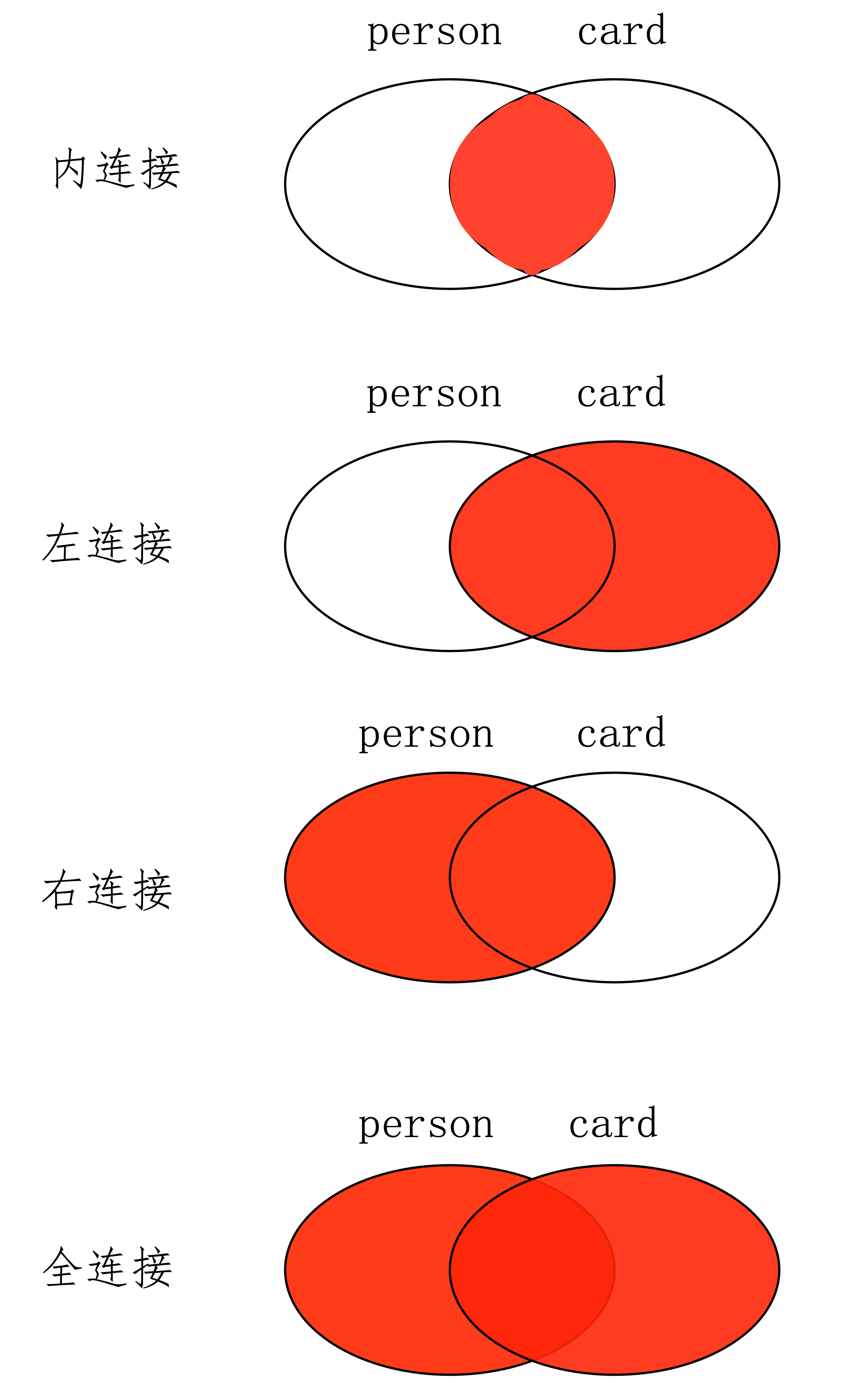
分析两张表发现,person 表并没有为 cardId 字段设置一个在 card 表中对应的 id 外键。如果设置了的话,personcardId 字段值为 6 的行就插不进去,因为该 cardId 值在 card 表中并没有

内连接

inner join 或者 join

要查询这两张表中有关系的数据,可以使用 INNER JOIN ( 内连接 ) 将它们连接在一起

1
2
3
4
5
6
7
8
9
10
11
12
select * from person inner join card on person.cardId = card.id;

mysql> select * from person inner join card on person.cardId = card.id;
+------+--------+--------+------+-----------+
| id | name | cardId | id | name |
+------+--------+--------+------+-----------+
| 1 | 张三 | 1 | 1 | 饭卡 |
| 2 | 李四 | 3 | 3 | 农行卡 |
+------+--------+--------+------+-----------+

-- 将 INNER 关键字省略掉,结果也是一样的
-- SELECT * FROM person JOIN card on person.cardId = card.id;

注意:card 的整张表被连接到了右边


外链接

左外连接:left join 或者 left outer join

完整显示左边的表 ( person ) ,右边的表如果符合条件就显示,不符合则补 NULL

1
2
3
4
5
6
7
8
9
10
11
12
select * from person left join card on person.cardId = card.id;

mysql> select * from person left join card on person.cardId = card.id;
+------+--------+--------+------+-----------+
| id | name | cardId | id | name |
+------+--------+--------+------+-----------+
| 1 | 张三 | 1 | 1 | 饭卡 |
| 2 | 李四 | 3 | 3 | 农行卡 |
| 3 | 王五 | 6 | NULL | NULL |
+------+--------+--------+------+-----------+

-- left outer join,结果也是一样的

右外连接:right join 或者 right outer join

完整显示右边的表 ( card ) ,左边的表如果符合条件就显示,不符合则补 NULL

1
2
3
4
5
6
7
8
9
10
11
12
13
14
select * from person right join card on person.cardId = card.id;

mysql> select * from person right join card on person.cardId = card.id;
+------+--------+--------+------+-----------+
| id | name | cardId | id | name |
+------+--------+--------+------+-----------+
| 1 | 张三 | 1 | 1 | 饭卡 |
| 2 | 李四 | 3 | 3 | 农行卡 |
| NULL | NULL | NULL | 2 | 建行卡 |
| NULL | NULL | NULL | 4 | 工商卡 |
| NULL | NULL | NULL | 5 | 邮政卡 |
+------+--------+--------+------+-----------+

-- right outer join,结果也是一样的

完全连接:full join 或者 full outer join

1
2
3
4
5
6
7
8
9
10
11
12
13
14
15
16
17
18
19
20
21
22
-- mysql 不支持全连接语法
-- SELECT * FROM person FULL JOIN card on person.cardId = card.id;
-- ERROR 1054 (42S22): Unknown column 'person.cardId' in 'on clause'

-- 使用union
select * from person left join card on person.cardId = card.id
union
select * from person right join card on person.cardId = card.id;

mysql> select * from person left join card on person.cardId = card.id
-> union
-> select * from person right join card on person.cardId = card.id;
+------+--------+--------+------+-----------+
| id | name | cardId | id | name |
+------+--------+--------+------+-----------+
| 1 | 张三 | 1 | 1 | 饭卡 |
| 2 | 李四 | 3 | 3 | 农行卡 |
| 3 | 王五 | 6 | NULL | NULL |
| NULL | NULL | NULL | 2 | 建行卡 |
| NULL | NULL | NULL | 4 | 工商卡 |
| NULL | NULL | NULL | 5 | 邮政卡 |
+------+--------+--------+------+-----------+


事务

在 MySQL 中,事务其实是一个最小的不可分割的工作单元。事务能够保证一个业务的完整性

1
2
3
4
5
6
-- 比如我们的银行转账:
-- a -> -100
UPDATE user set money = money - 100 WHERE name = 'a';

-- b -> +100
UPDATE user set money = money + 100 WHERE name = 'b';

在实际项目中,假设只有一条 SQL 语句执行成功,而另外一条执行失败了,就会出现数据前后不一致。

因此,在执行多条有关联 SQL 语句时,事务会要求这些 SQL 语句要么同时执行成功,要么就都执行失败。


如何控制事务 - COMMIT / ROLLBACK

在 MySQL 中,事务的自动提交状态默认是开启的

1
2
3
4
5
6
7
8
9
-- 查询事务的自动提交状态
SELECT @@AUTOCOMMIT;

mysql> SELECT @@AUTOCOMMIT;
+--------------+
| @@AUTOCOMMIT |
+--------------+
| 1 |
+--------------+

自动提交的作用:当我们执行一条 SQL 语句的时候,其产生的效果就会立即体现出来,且不能回滚

什么是回滚?举个例子:

1
2
3
4
5
6
7
8
9
10
11
12
13
14
15
16
17
CREATE DATABASE bank;

CREATE TABLE user (
id INT PRIMARY KEY,
name VARCHAR(20),
money INT
);

-- 插入数据
INSERT INTO user VALUES (1, 'a', 1000);

SELECT * FROM user;
+----+------+-------+
| id | name | money |
+----+------+-------+
| 1 | a | 1000 |
+----+------+-------+

可以看到,在执行插入语句后数据立刻生效,原因是 MySQL 中的事务自动将它提交到了数据库中。那么所谓回滚的意思就是,撤销执行过的所有 SQL 语句,使其回滚到最后一次提交数据时的状态。

在 MySQL 中使用 ROLLBACK 执行回滚:

1
2
3
4
5
6
7
8
9
10
11
12
-- 回滚到最后一次提交
rollback;

mysql> rollback;
Query OK, 0 rows affected (0.00 sec)

mysql> SELECT * FROM user;
+----+------+-------+
| id | name | money |
+----+------+-------+
| 1 | a | 1000 |
+----+------+-------+

由于所有执行过的 SQL 语句都已经被提交过了,所以数据并没有发生回滚。那如何让数据可以发生回滚: 设置AUTOCOMMIT = 0;

1
2
3
4
5
6
7
8
9
10
11
12
13
14
15
16
17
18
19
20
21
22
23
24
25
26
27
28
29
30
31
32
33
34
35
36
37
38
39
40
41
42
43
44
45
46
47
48
49
50
51
52
53
54
55
56
57
58
59
60
61
62
-- 关闭自动提交
-- 关闭 AUTOCOMMIT 后,数据的变化是在一张虚拟的临时数据表中展示,
-- 发生变化的数据并没有真正插入到数据表中。
SET AUTOCOMMIT = 0;

mysql> SET AUTOCOMMIT = 0;
Query OK, 0 rows affected (0.00 sec)

mysql> select @@autocommit;
+--------------+
| @@autocommit |
+--------------+
| 0 |
+--------------+


-- 测试回滚
INSERT INTO user VALUES (2, 'b', 1000);

mysql> INSERT INTO user VALUES (2, 'b', 1000);
Query OK, 1 row affected (0.00 sec)

mysql> SELECT * FROM user;
+----+------+-------+
| id | name | money |
+----+------+-------+
| 1 | a | 1000 |
| 2 | b | 1000 |
+----+------+-------+

mysql> rollback;
Query OK, 0 rows affected (0.00 sec)

mysql> SELECT * FROM user;
+----+------+-------+
| id | name | money |
+----+------+-------+
| 1 | a | 1000 |
+----+------+-------+


-- 手动提交数据(持久性),
-- 将数据真正提交到数据库中,执行后不能再回滚提交过的数据
commit;

mysql> INSERT INTO user VALUES (2, 'b', 1000);
Query OK, 1 row affected (0.00 sec)

mysql> commit;
Query OK, 0 rows affected (0.00 sec)

mysql> rollback;
Query OK, 0 rows affected (0.00 sec)

mysql> SELECT * FROM user;
+----+------+-------+
| id | name | money |
+----+------+-------+
| 1 | a | 1000 |
| 2 | b | 1000 |
+----+------+-------+
-- 发现回滚无效

总结:

  1. 自动提交

    • 查看自动提交状态:SELECT @@AUTOCOMMIT
    • 设置自动提交状态:SET AUTOCOMMIT = 0
  2. 手动提交

    @@AUTOCOMMIT = 0 时,使用 COMMIT 命令提交事务。

  3. 事务回滚

    @@AUTOCOMMIT = 0 时,使用 ROLLBACK 命令回滚事务。

1
2
3
4
5
6
7
8
9
10
11
12
13
14
15
16
17
18
19
20
21
22
23
24
25
-- 测试银行转账
update user set money = money - 100 where id = 1;
update user set money = money + 100 where id = 2;

mysql> select * from user;
+----+------+-------+
| id | name | money |
+----+------+-------+
| 1 | a | 900 |
| 2 | b | 1100 |
+----+------+-------+

-- 回滚:假设转账发生了意外,需要回滚
rollback;

mysql> rollback;
Query OK, 0 rows affected (0.00 sec)

mysql> select * from user;
+----+------+-------+
| id | name | money |
+----+------+-------+
| 1 | a | 1000 |
| 2 | b | 1000 |
+----+------+-------+

这时我们又回到了发生意外之前的状态,也就是说,事务给我们提供了一个可以反悔的机会。假设数据没有发生意外,这时可以手动将数据真正提交到数据表中:COMMIT


手动开启事务 - BEGIN / START TRANSACTION

1
2
3
4
5
6
7
8
9
10
11
-- 设置为自动提交
set autocommit = 1;

select @@autocommit;

mysql> select @@autocommit;
+--------------+
| @@autocommit |
+--------------+
| 1 |
+--------------+

事务的默认提交被开启 ( @@AUTOCOMMIT = 1 ) 后,此时就不能使用事务回滚了。但是我们还可以手动开启一个事务处理事件,使其可以发生回滚:

使用 BEGIN 或者 START TRANSACTION 手动开启一个事务:

1
2
3
4
5
6
7
8
9
10
11
12
13
14
15
16
17
18
19
20
21
22
23
24
25
26
27
28
-- 使用 BEGIN 或者 START TRANSACTION 手动开启一个事务
begin;
update user set money = money - 100 where id = 1;
update user set money = money + 100 where id = 2;

mysql> select * from user;
+----+------+-------+
| id | name | money |
+----+------+-------+
| 1 | a | 900 |
| 2 | b | 1100 |
+----+------+-------+

-- 回滚
rollback;

mysql> rollback;
Query OK, 0 rows affected (0.00 sec)

mysql> select * from user;
+----+------+-------+
| id | name | money |
+----+------+-------+
| 1 | a | 1000 |
| 2 | b | 1000 |
+----+------+-------+

-- 用commit提交事务

事务的 ACID 特征与使用

事务的四大特征:

A(Atomicity):原子性:事务是最小的单位,不可以再分割;

C(Consistency):一致性:要求同一事务中的 SQL 语句,必须保证同时成功或者失败;

I(Isolation): 隔离性:事务1 和 事务2 之间是具有隔离性的;

D(Durability):持久性:事务一旦结束 ( COMMIT ) ,就不可以再返回了 ( ROLLBACK ) ;


事务的隔离性可分为四种 ( 性能从低到高 )

  1. READ - UNCOMMITTED ( 读取未提交 )

    如果有多个事务,那么任意事务都可以看见其他事务的未提交数据

  2. READ - COMMITTED ( 读取已提交 )

    只能读取到其他事务已经提交的数据

  3. REPEATABLE - READ ( 可被重复读 )

    如果有多个连接都开启了事务,那么事务之间不能共享数据记录,否则只能共享已提交的记录。

  4. SERIALIZABLE ( 串行化 )

    所有的事务都会按照固定顺序执行,执行完一个事务后再继续执行下一个事务的写入操作

1
2
3
4
5
6
7
8
9
10
11
12
13
14
15
16
17
18
19
20
21
22
23
24
25
26
27
-- 查看当前数据库的默认隔离级别:
-- MySQL 8.x, GLOBAL 表示系统级别,不加表示会话级别。
SELECT @@GLOBAL.TRANSACTION_ISOLATION;
SELECT @@TRANSACTION_ISOLATION;


-- MySQL 5.x
mysql> SELECT @@GLOBAL.TX_ISOLATION;
+-----------------------+
| @@GLOBAL.TX_ISOLATION |
+-----------------------+
| REPEATABLE-READ | -- MySQL的默认隔离级别,可以重复读。
+-----------------------+


-- 设置系统隔离级别,LEVEL 后面表示要设置的隔离级别 (READ UNCOMMITTED)
set global transaction isolation level READ COMMITTED;

mysql> set global transaction isolation level READ COMMITTED;
Query OK, 0 rows affected (0.01 sec)

mysql> SELECT @@GLOBAL.TX_ISOLATION;
+-----------------------+
| @@GLOBAL.TX_ISOLATION |
+-----------------------+
| READ-COMMITTED |
+-----------------------+

脏读:READ UNCOMMITTED ( 读取未提交 )

一个事务读取到另外一个事务还未提交的数据。这在实际开发中是不允许出现的;

如果此时 rollback ,之前操作的数据就会失效


不可重复读:读取已提交:READ - COMMITTED ( 读取已提交 )

虽然 READ COMMITTED 让我们只能读取到其他事务已经提交的数据,但还是会出现问题,就是在读取同一个表的数据时,可能会发生前后不一致的情况。这被称为不可重复读现象 ( READ COMMITTED )


幻读:REPEATABLE - READ ( 可被重复读 )

当前事务开启后,没提交之前,查询不到,提交后可以被查询到。但是,在提交之前其他事务被开启了,那么在这条事务线上,就不会查询到当前有操作事务的连接。相当于开辟出一条单独的线程。

无论小张是否执行过 COMMIT ,在小王这边,都不会查询到小张的事务记录,而是只会查询到自己所处事务的记录

1
2
3
4
5
6
7
8
9
10
11
12
13
14
15
16
17
18
19
20
-- 小张 - 成都
START TRANSACTION;
INSERT INTO user VALUES (6, 'd', 1000);

-- 小王 - 北京
START TRANSACTION;

-- 小张 - 成都
COMMIT;

SELECT * FROM user;
+----+-----------+-------+
| id | name | money |
+----+-----------+-------+
| 1 | a | 900 |
| 2 | b | 1100 |
| 3 | 小明 | 1000 |
| 4 | 淘宝店 | 1000 |
| 5 | c | 100 |
+----+-----------+-------+

这是因为小王在此之前开启了一个新的事务 ( START TRANSACTION ) ,那么在他的这条新事务的线上,跟其他事务是没有联系的,也就是说,此时如果其他事务正在操作数据,它是不知道的。

然而事实是,在真实的数据表中,小张已经插入了一条数据


串行化:SERIALIZABLE ( 串行化 )

1
2
3
4
5
6
7
8
9
10
11
12
13
14
15
16
17
18
19
20
21
22
23
24
25
26
27
28
29
30
31
32
33
34
35
36
37
38
-- 设置隔离级别
set global transaction isolation level SERIALIZABLE;

mysql> set global transaction isolation level SERIALIZABLE;
Query OK, 0 rows affected (0.00 sec)

mysql> SELECT @@GLOBAL.TX_ISOLATION;
+-----------------------+
| @@GLOBAL.TX_ISOLATION |
+-----------------------+
| SERIALIZABLE |
+-----------------------+


-- 小张插入数据
INSERT INTO user VALUES (7, 'hhh', 1000);

mysql> commit;
Query OK, 0 rows affected (0.00 sec)

mysql> select * from user;
+----+------+-------+
| id | name | money |
+----+------+-------+
| 1 | a | 1000 |
| 2 | b | 1000 |
| 7 | hhh | 1000 |
+----+------+-------+

-- 小王查询
mysql> select * from user;
+----+------+-------+
| id | name | money |
+----+------+-------+
| 1 | a | 1000 |
| 2 | b | 1000 |
| 7 | hhh | 1000 |
+----+------+-------+

此时会发生什么呢?由于现在的隔离级别是 SERIALIZABLE ( 串行化 ) ,串行化的意思就是:假设把所有的事务都放在一个串行的队列中,那么所有的事务都会按照固定顺序执行,执行完一个事务后再继续执行下一个事务的写入操作 ( 这意味着队列中同时只能执行一个事务的写入操作 ) 。

根据这个解释,小王在插入数据时,会出现等待状态,直到小张执行 COMMIT 结束它所处的事务,或者出现等待超时。 所以性能较差